Review
One conversation about how the job is done today. We find where AI would actually pay off — or tell you it wouldn't.

Taking on new clients now
The job someone on your team does over and over. We work out how AI can do it instead, then build it — usually running within a week.
Free review, 30 minutes to an hour of your time. Then we build it and run it for you — there's nothing for your team to maintain.
What an AI workflow looks like
AI reads the PDF and pulls out the details. The bill gets filed on its own. Anything over £1,000 still waits for a person to approve it.
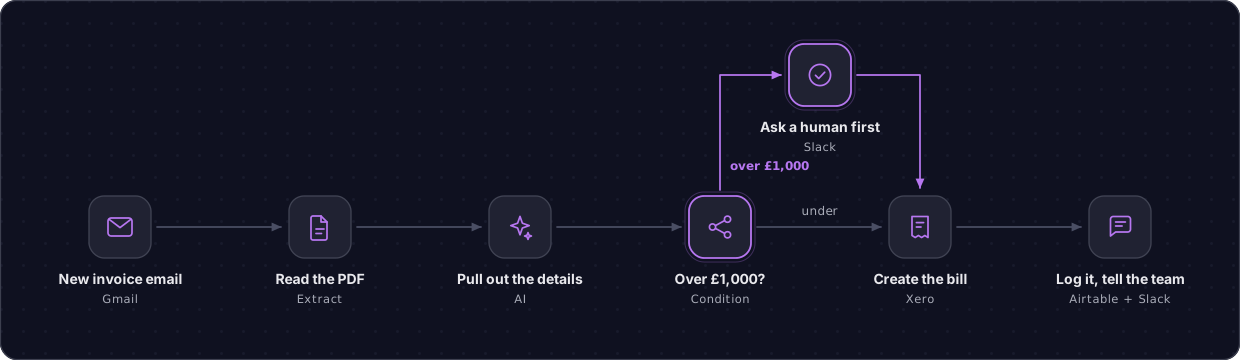
← swipe to see the whole thing
Yours would look different. Same idea: AI does the repetitive part, and it stops being someone's job.
Book a free reviewHow it works
One conversation about how the job is done today. We find where AI would actually pay off — or tell you it wouldn't.
We build the AI workflow against your real systems and test it on your own past cases. A human still approves anything costly.
It goes live and we run it from there. Hosting, monitoring, fixes when a provider changes something — all handled. Nothing for your team to keep an eye on.
Nothing. We host it, run it and fix it. When an AI provider changes something at their end, that's our problem to solve, not a ticket for your team. You won't need anyone technical in-house, before or after.
A fixed price to build it, agreed in writing before work starts. Then a monthly fee to run it. Cancel any time. We don't publish figures because one build and a multi-department programme aren't comparable.
What we automate
Then AI can probably do it. That's the whole test. We use AI where it earns its place and ordinary automation where it doesn't — we don't resell a platform, so we're not limited to one product.
Invoices, contracts, forms, CVs, timesheets — AI reads them so nobody has to.
The same data re-typed into a second and third system.
The inbox someone sorts by hand every morning, and the replies AI can draft for them.
Approvals, onboarding, and the person who has to remember.
The monthly report that eats a whole day, pulled together automatically.
Most of what we're asked about isn't on this list. Ask anyway.
Your data
Specific enough to check. That's the point.
Excluded by contract with the AI providers we use, not by a setting you can toggle.
Never on a handshake, and it names every sub-processor.
Not admin rights. Handed back or revoked when we're done.
Every decision logged and reversible. AI removes the typing, not the judgement.
Questions
Yes. 30 minutes to an hour of your team's time, and you keep the written recommendation regardless of what happens next.
It's free because it's also how we decide whether we can help. Better to find that out in half an hour than three months in.
Two parts. A fixed price to build it, agreed in writing before any work starts — no day rates, no scope creep billed as extras. Then a monthly fee to run it for you: hosting, monitoring, and fixing it when something changes.
Cancel any time. It runs on infrastructure we manage, so it stops when you stop — no notice period, nothing to argue about.
Both are normal. Smaller teams often see the fastest return, because one person is doing three jobs and the manual work is obvious.
And most enquiries describe something we haven't built before — working out how is the job. Describe it in plain English; you don't need to know what AI can or can't do.
Yes, for the first workflow — scoped deliberately so that it can be. That's why the review comes first: it's where we check the week is achievable before either of us commits.
Access and decisions are what slow it down. Given credentials and a named approver, a week is comfortable.
We're small on purpose. The person who builds your workflow is the person who answers when you message — not a support desk three levels away who has never seen your setup.
Get in touch
Tell us the worst job in your week. We'll tell you straight whether AI can do it, what it would cost and how long it would take — in half an hour, for nothing.
From the person who'd do the work, not an autoresponder.
Ideally with whoever does the process day to day. No preparation needed.
What to automate, what it saves, a fixed price, how long. Or an honest note that it isn't worth doing.
Prefer email? enquiries@brookesai.com